A Different Kind of Video Tool for Windows
If you're looking for a traditional video editor — something to cut footage, add transitions, and polish raw clips — tools like DaVinci Resolve, Clipchamp, or Adobe Premiere are built for that. VimEcho Studio is something different.
It's designed for creators and teams whose videos start with a written script. Load the script, add your slides and narration, click Generate. A complete, synced video is produced on your Windows machine — offline, in minutes, with no editing timeline involved.
Honest positioning: VimEcho Studio isn't for everyone. If you need to edit raw video footage, it's not the right tool. If you produce narrated slide-style content — tutorials, training videos, YouTube explainers, or onboarding — it's significantly faster than a traditional editor for that specific workflow.
✓ Windows 8/10/11 · ✓ One-time purchase · ✓ Offline after activation
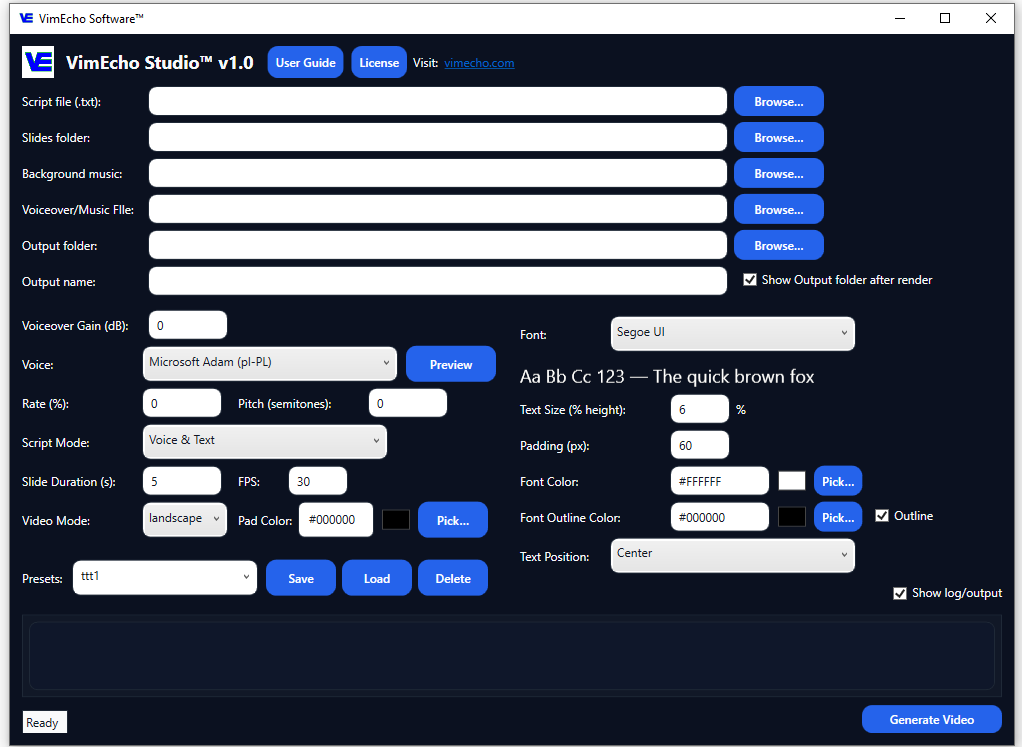
Traditional Video Editor vs. VimEcho Studio
Two different tools for two different workflows — here's how to know which one you need.
Traditional Video Editor (DaVinci, Premiere, etc.)
- Best for editing raw video footage
- Cinematic cuts, color grading, complex transitions
- Talking-head or footage-heavy content
- Full manual control over every frame
- Significant learning curve and setup time
- Hours of editing even for short videos
VimEcho Studio
- Best for script-based narrated content
- Tutorials, training, explainers, YouTube content
- Script drives timing — no manual sync needed
- Generate a finished video in minutes
- No editing experience required
- Offline on Windows — your files stay local
Four Production Modes — One Tool
VimEcho Studio adapts to different content formats through four script modes, each producing a different style of video output.
Voice + Text
The default mode. TTS narration is generated from your script, slides advance automatically in sync with the voice, and your script text appears as captions on each slide. Best for most tutorial, training, and educational content.
Voice Only
Narration is generated and synced to your slides — but no text appears on screen. Best for content where the visuals should stand alone, or where on-screen captions would distract from the imagery.
Text Only
Slides advance with text captions but no spoken narration. Timing is controlled by your Slide Duration setting, or by an uploaded audio file. Works for silent tutorial videos, lyric-style content, or presentations with background music only.
No Script
Pure visual output — images cycle through with no text and no narration. Timing is driven by an uploaded audio file or your Slide Duration setting. Ideal for music videos, visual demos, slideshows, and animation sequences.
What VimEcho Studio Actually Does
More than a basic slide tool — here's the full feature set built into version 1.0.
Script-Driven Slide Sync
Each line of your .txt script file maps to one slide. With TTS narration, slides advance automatically in sync with the voice — no manual timing adjustments required.
TTS or Uploaded Narration
Use any available Windows TTS voice — preview rate and pitch before rendering — or upload your own WAV, MP3, or OGG narration file. Uploaded files override TTS and control total video duration.
Automatic Background Music Mixing
Add a background music track in MP3, WAV, or OGG. VimEcho loops it if shorter than the video, fades it out if longer, and automatically balances it against your narration — no separate audio mixing needed.
Custom Slide Folders
Point to any folder of JPEG or PNG images. Slides are ordered alphabetically — name them Slide_01, Slide_02 etc. for precise control. Images are automatically scaled to 1280×720 with your chosen pad color filling any negative space.
Project Presets
Save any combination of settings — script path, slides folder, voice, music, output location — as a named preset. Load it instantly for your next video in that series. Perfect for recurring content formats.
Landscape & Portrait Output
Switch between landscape (standard YouTube/widescreen) and portrait (short-form, vertical video) output modes. 1280×720 HD output in both orientations.
Text Styling Controls
Choose from any Windows-installed font. Adjust text size, font color, outline color, padding, and position — Top, Center, or Bottom. Preview your font settings live before rendering.
Animation Mode
Load a sequence of images with a very short slide duration to create frame-by-frame animations. At 16 FPS, approximately 1,920 frames produce a smooth 2-minute animation — no separate animation software needed.
Music Video & Lyric Mode
Upload a music file and use Text Only or Voice + Text mode to create lyric videos. Each script line spaces evenly across the uploaded track's duration, syncing text to your music timeline.
Technical Specifications
Everything you need to know before downloading.
| Specification | Details |
|---|---|
| Platform | Windows 8, Windows 10, Windows 11 |
| Output format | MP4 video file |
| Default resolution | 1280 × 720 (HD) — landscape and portrait |
| Script format | .txt — one line per slide |
| Slide image formats | .jpg .png — scaled automatically to 1280×720 |
| Audio file formats | .wav .mp3 .ogg for both voiceover and background music |
| TTS voices | All installed Windows TTS voices (Zira, David, and any downloaded language packs) |
| Render speed | Approximately 40–75% of final video length (e.g., a 10-minute video renders in ~4–7.5 minutes) |
| Default FPS | 30 FPS (adjustable) |
| Internet required | One-time license activation only — fully offline after that |
| Pricing | One-time purchase, seat-based. From $19.99 for 2 seats. |
Videos Made With VimEcho Studio on Windows
Every video below was generated locally on a Windows machine — no cloud render, no editing timeline.
Full workflow overview
Training example — Forklift Safety
Creator example — "Saving Your First $1,000"
What People Use VimEcho Studio to Make
The same Windows tool, across a range of content types and industries. If you prefer automation over manual editing, explore script-to-video generation or offline video workflows.
YouTube & Faceless Channels
Tutorials, explainers, list videos, and educational content — at publishing speed without a camera or editing studio.
YouTube creator workflow →Internal Training Videos
Safety training, SOP walkthroughs, software tutorials — consistent, reusable, and easy to update when processes change.
Training video workflow →Employee Onboarding
Build a modular onboarding library every new hire goes through — standardized, offline, private.
Onboarding workflow →Private & Sensitive Content
Legal, healthcare, compliance, and government content that must stay within your internal environment.
Private video workflow →For script-based content, the right tool isn't the most powerful editor. It's the one that gets from script to finished video with the least friction.
Frequently Asked Questions
Is VimEcho Studio a traditional video editor for Windows?
No — and that's by design. VimEcho Studio is a script-to-video tool, not a timeline-based editor. It's built for narrated slide-style content: tutorials, training videos, YouTube explainers, and onboarding. If you need to edit raw footage with complex transitions, a traditional editor is the right tool for that. If your content starts with a script, VimEcho is significantly faster.
What Windows versions does VimEcho Studio support?
VimEcho Studio supports Windows 8, Windows 10, and Windows 11.
What video format does VimEcho Studio output?
MP4 video files at 1280×720 (HD) resolution, in both landscape and portrait orientations.
Can I use my own voiceover instead of TTS?
Yes. VimEcho Studio supports uploaded voiceover files in WAV, MP3, or OGG format. When you upload your own narration, slide timing automatically distributes across the length of your audio file — no manual sync required.
How long does it take to render a video?
Approximately 40–75% of the finished video's length. A 10-minute video renders in roughly 4–7.5 minutes. Longer videos or more complex settings (custom slides, background music, uploaded voiceover) may take slightly longer.
Does VimEcho Studio require an internet connection?
Only once — to activate your license key after purchase. After that, it runs entirely offline on Windows with no internet connection required to generate videos.
Is VimEcho Studio a subscription?
No. It's a one-time purchase per seat — from $19.99 for a 2-seat license. No monthly fees, no output limits, no renewal required.
The Faster Windows Video Workflow for Script-Based Content
If your video production starts with a script, VimEcho Studio gets you from that script to a finished video faster than any traditional editor — offline, on your machine, at a price you pay once.
Get VimEcho Studio — from $19.99Windows 8/10/11 · One-time purchase · Offline after activation · License key by email