A Script-to-Video Generator That Runs on Your Machine
Most script-to-video tools work the same way — send your script to a cloud server, wait for AI to generate visuals, pay a monthly fee. VimEcho Studio works differently. You write the script, you choose the visuals, and everything generates locally on your Windows PC. No cloud render. No subscription. No AI guessing what your video should look like.
The result is predictable, consistent video output — every time, entirely offline.
✓ One-time purchase · ✓ Windows · ✓ Offline after activation
What Is a Script-to-Video Generator?
The category explained — and how VimEcho fits into it.
A script-to-video generator converts written text into structured video content. Instead of building a video manually — dragging clips onto a timeline, syncing audio, adjusting slide durations — the script itself becomes the production blueprint. Each line or section of your script maps to a visual element in the video, with narration delivered in sync.
This approach is useful because most video content starts as written text anyway — a lesson plan, a training document, a YouTube outline, a product explanation. Script-to-video tools eliminate the gap between that written content and the finished video.
The main question when choosing a script-to-video generator is: where does the processing happen, and who controls the visuals?
With VimEcho Studio, you get:
- Script-driven slide timing — each line maps to one slide
- Your own images and slides — not AI-generated ones
- TTS narration or your own recorded voice
- Optional background music
- Local processing — nothing uploaded to generate the video
- One-time purchase — unlimited video output
AI Script-to-Video Tools vs. VimEcho Studio
Understanding the tradeoffs between cloud AI generators and an offline workflow.
| Feature | Cloud AI Generators | VimEcho Studio |
|---|---|---|
| Visual source | AI-generated (unpredictable) | Your own images and slides (consistent) |
| Processing location | Cloud servers — content uploaded | Local Windows PC — nothing uploaded |
| Internet required | Every render requires connection | Only once, for license activation |
| Pricing model | Monthly subscription, often per-minute | One-time purchase per seat |
| Output consistency | Varies — AI chooses visuals each render | Identical output every render from same inputs |
| Content privacy | Script sent to external servers | Script stays on your machine |
| Access after cancellation | Tool and projects inaccessible | Software is yours permanently |
Cloud AI tools are powerful for rapid prototyping with no asset library. VimEcho Studio is the right choice when you need predictable output, content privacy, or a one-time cost for ongoing production volume.
How VimEcho Studio Generates Videos from Scripts
A structured four-step process that runs entirely on your machine.
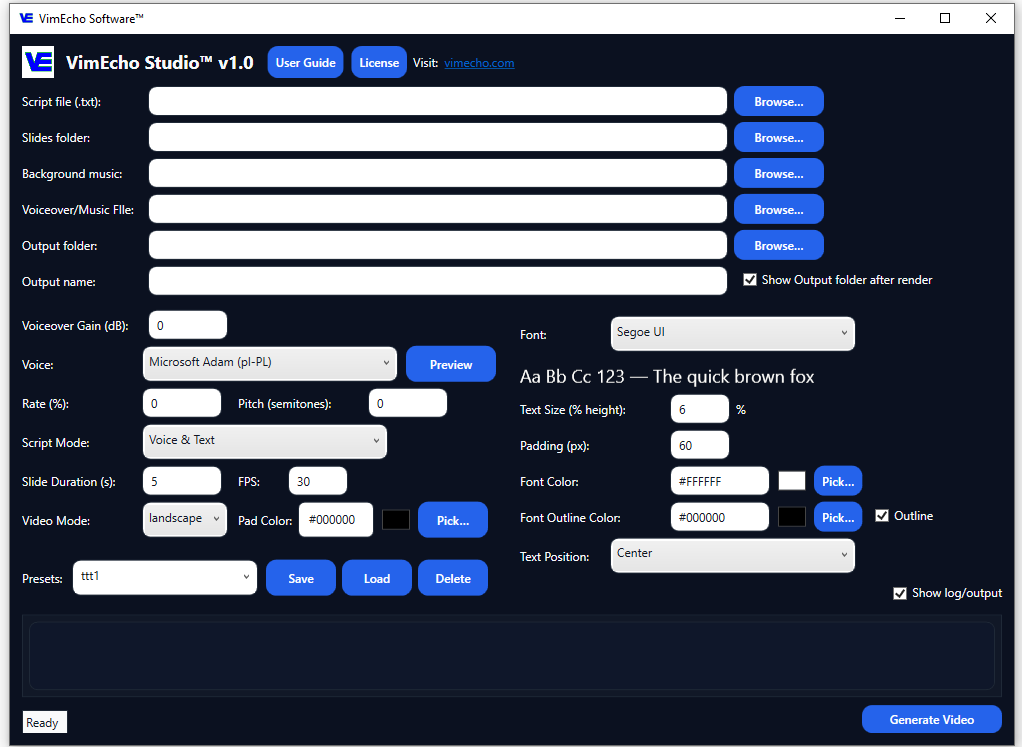
Load Your Script
Open your script file in VimEcho Studio. Each line of the script becomes one timed slide in the finished video — the script is the production blueprint. Write it yourself, or use an AI tool to draft a starting point then refine.
Point to Your Slide Folder
Select the folder containing your supporting images — slides, screenshots, diagrams, stock photos, or anything relevant to your content. VimEcho reads from this folder locally. Nothing is uploaded.
Choose Voice and Music
Select a built-in TTS voice for fast production, or import your own narration recording. Add optional background music from your local library. All audio is processed on-device.
Generate — Locally, Instantly
Name the output file, select the destination folder, click Generate. VimEcho produces a finished video by syncing your script, slides, narration, and music — no cloud request, no waiting on a server queue.
How Script-to-Slide Sync Works
The technical logic behind VimEcho Studio's script-driven approach.
Line-by-Line Mapping
Each line of your script corresponds to one slide in your image folder. VimEcho reads both in order and pairs them — line one with image one, line two with image two, and so on. Structure your script, structure your video.
Narration-Driven Timing
The duration of each slide is determined by how long the narration for that line takes to speak. No manual timing adjustments — the slide stays on screen exactly as long as the narration for it runs.
Music Layered Automatically
Background music is mixed in automatically behind the narration. No separate audio track editing — VimEcho handles the layering and outputs a single mixed video file.
Who Uses a Script-to-Video Generator
Script-to-video workflows appear across a wide range of content types and industries. VimEcho Studio covers all of them.
YouTube Creators & Faceless Channels
Build tutorials, explainers, list videos, and educational content at publishing speed. No camera, no editing studio.
YouTube creator workflow →Internal Training & HR Teams
Convert SOPs, policies, and onboarding materials into reusable video modules — consistent across every employee, every cohort.
Training video workflow →Educators & Course Creators
Turn lesson plans and course outlines into structured lecture videos. Repeatable format, controlled pacing, consistent visual style.
Creator workflow →Employee Onboarding Programs
Build a modular onboarding video library that every new hire goes through — standardized, reusable, and easy to update when policies change.
Onboarding video workflow →Privacy-Sensitive Workflows
Legal, healthcare, compliance, and government teams that need script-to-video production without content leaving their internal environment.
Private video workflow →Marketing & Product Teams
Produce product explainers, feature walkthroughs, and client-facing educational content at volume without per-render cloud costs.
VimEcho Studio overview →Videos Generated from Scripts Using VimEcho Studio
Every video below was produced entirely inside VimEcho Studio — no external editing software, no cloud rendering.
General workflow overview
Creator example — "Best Side Hustles in 2026"
Training example — Forklift Safety
Explore how this works for YouTube content creation, internal training videos, or creative video projects.
Frequently Asked Questions
What is a script-to-video generator?
A script-to-video generator converts written text into structured video content. The script drives the timing, narration, and visual structure — instead of building a timeline manually. VimEcho Studio maps each line of your script to a synchronized slide, with narration and optional music handled automatically.
What is the difference between an AI script-to-video tool and VimEcho Studio?
AI tools generate visuals automatically using cloud processing — they require internet access, upload your content to external servers, and produce AI-generated imagery that can vary unpredictably. VimEcho Studio uses your own slides and images, processes everything locally on your Windows PC, and produces consistent output every time — with no cloud upload and no subscription.
Does VimEcho Studio require an internet connection to generate videos?
No. Only a one-time internet connection is needed to activate your license key after purchase. After that, VimEcho generates videos completely offline.
What types of videos can be made with a script-to-video generator?
Script-to-video workflows work well for any narrated slide-style content: YouTube tutorials, educational explainers, list videos, internal training modules, employee onboarding, SOP walkthroughs, safety training, marketing explainers, and course content.
Can I use my own voiceover instead of TTS?
Yes. VimEcho Studio supports both built-in TTS voices and imported narration recordings. Switch between them per project or per language version.
Is VimEcho Studio a subscription?
No. It's a one-time purchase per seat — from $19.99 for a 2-seat license. No monthly fees, no output limits, no renewal required.
Ready to Generate Videos from Your Scripts?
If your content workflow starts with a written script, VimEcho Studio is the fastest path from that script to a finished video — offline, on your machine, at a price you pay once.
Get VimEcho Studio — from $19.99Windows · One-time purchase · Offline after activation · License key by email