Onboarding Videos That Are Consistent, Reusable, and Private
Every new hire deserves the same onboarding experience. In practice, that means video — not a live session that varies by manager, department, or day of the week. VimEcho Studio lets HR teams build a full onboarding video library offline, on Windows, without editing experience or cloud subscriptions.
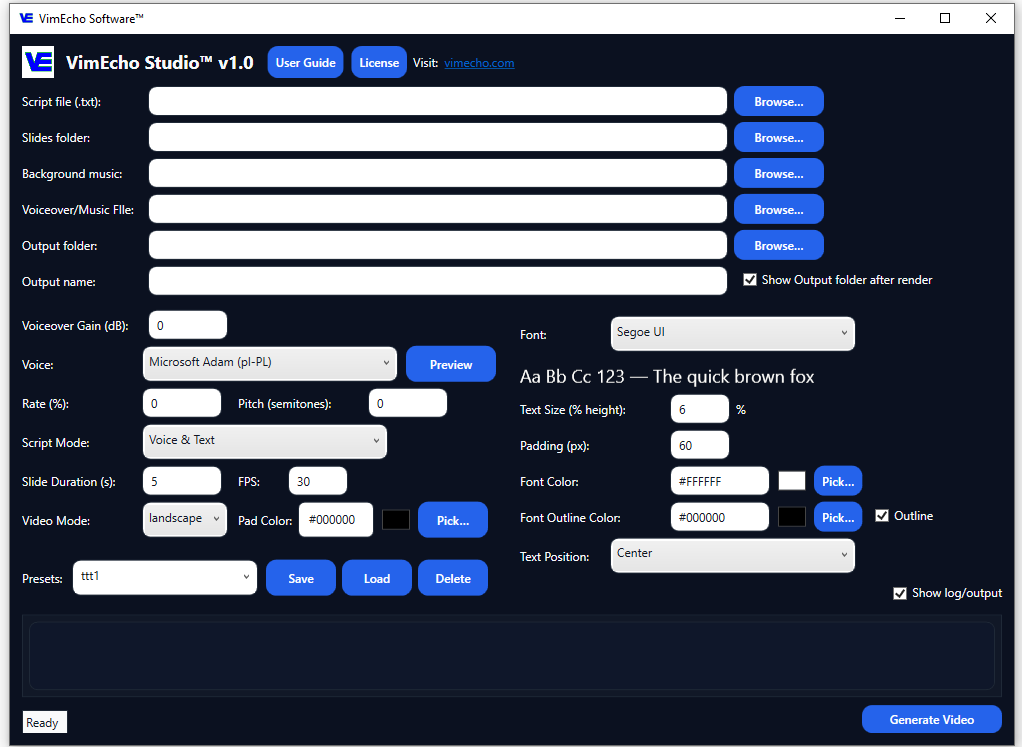
Write the script, add supporting images, choose a voice, generate. Update a policy? Edit the script and regenerate. No re-recording, no expensive production retake.
✓ One-time purchase · ✓ Windows · ✓ HR content stays on your machine
The Cost of Inconsistent Onboarding
Poor onboarding doesn't just frustrate new hires — it has measurable business impact.
Higher Retention
Employees who experience a structured onboarding program are significantly more likely to stay with a company for three or more years.
Faster Productivity
New hires with structured onboarding reach full productivity much sooner than those left to figure things out informally.
More Likely to Recommend
Employees who had a great onboarding experience are far more likely to recommend their employer — helping future hiring too.
Source figures based on widely reported onboarding research and industry benchmarks.
Why HR Teams Build Onboarding Video Libraries
Video solves the consistency problem that live onboarding can't. Onboarding content is often part of a larger training system or built using presentation-style videos.
Same Experience for Every New Hire
A video plays the same way every time — regardless of which manager is available, which office the hire is in, or what day of the week it is. Standardization stops being aspirational and starts being automatic.
Less Time Spent on Repeated Presentations
HR teams spend significant time delivering the same information over and over to each cohort. A reusable video library reclaims that time for more complex, high-value work.
Documented Compliance Communication
When policies are delivered via video, you know exactly what was communicated, when, and in what words. That clarity matters for compliance and audit purposes.
Easy to Update When Policies Change
With VimEcho Studio, policy updates mean editing a script and regenerating a video — not re-recording full sessions or waiting on a video production team.
A Structured Onboarding Video Program
Most effective onboarding programs are modular — broken into phases across the first days and weeks. VimEcho makes it practical to build and maintain each module separately.
Welcome & Company Overview
First impressions matter. Give every new hire the same warm, structured introduction to your organization.
HR Policies & Benefits
Deliver the information new hires need most — benefits enrollment, leave policies, code of conduct — clearly and consistently.
Safety & Compliance Training
Workplace safety and regulatory compliance delivered the same way to every employee — not dependent on who happens to be running the session.
Role-Specific & Systems Training
Department-specific walkthroughs, internal tool training, and process explanations tailored to the role — reusable for every hire into that position.
How to Build an Onboarding Video With VimEcho Studio
Four steps — start with the content you already have.
Turn Your Onboarding Docs Into a Script
Most HR teams already have written onboarding materials — policy handbooks, process documents, benefit guides. Convert those into a structured script. Each line becomes one timed slide in the finished video.
Add Supporting Images or Slides
Gather relevant visuals — company photos, org chart screenshots, policy diagrams, system screenshots. Organize them in a folder and point VimEcho to it. One image per script section.
Choose Narration & Optional Music
Use built-in TTS for a quick, professional result — or upload a recorded narration for a more personal tone. Add optional background music if you want the video to feel more polished.
Generate the Finished Module
Click Generate. VimEcho syncs your script, slides, narration, and music into a complete onboarding video. Save it to your internal library, share it with new hires, and reuse it for every cohort that follows.
See an Onboarding-Style Video in Action
This workplace safety training video was created entirely inside VimEcho Studio on a local Windows machine.
Workplace Safety Training — English
Before and After VimEcho Studio
What changes when you replace live or ad-hoc onboarding delivery with a structured video library.
Without Onboarding Videos
- Different managers deliver different information
- New hires miss critical details depending on who's available
- HR repeats the same presentation for every cohort
- Policy updates require retraining across all staff
- No record of what was actually communicated
With VimEcho Studio
- Every hire gets the same structured experience
- Critical information is never missed or abbreviated
- HR sets it up once and reuses it indefinitely
- Policy changes = script edit + regenerate
- Video record of exactly what was communicated
Onboarding in Multiple Languages — Without a Separate Production Run
For organizations with multilingual workforces, VimEcho Studio makes language versions straightforward. Translate the onboarding script, select the appropriate TTS voice or upload a narration recording in the new language, and generate. The same slide folder is reused — only the audio changes. No additional editing, no separate production workflow per language.
Safety Training — Spanish
Safety Training — Chinese
Key Features for HR Teams
Purpose-built for structured, repeatable content production.
HR Content Stays Private
Policies, compensation details, and sensitive HR materials never leave your machine. No cloud platform has access to your onboarding content.
Easy Policy Updates
Edit the script, click regenerate. No re-recording sessions, no video editor required. Keep your library current as policies evolve.
Consistent Format Every Time
Every video follows the same structure. Every new hire gets the same experience. Consistency becomes a system, not a goal.
TTS or Your Own Voice
Use built-in TTS for speed, or record narration for a more personal tone. Switch per module or per language version.
Multi-Language Ready
Translate, swap the voice, generate a second version. Serve multilingual teams from the same slide library.
One-Time Cost
No subscription that scales with your headcount. Buy a license for your team, build the library, and use it as long as you need it.
The best onboarding experience is the one every single new hire gets — not just the ones lucky enough to start on a good week.
Frequently Asked Questions
Can VimEcho Studio be used for employee onboarding videos?
Yes. It works for the full range of onboarding content — company culture introductions, benefits explanations, workplace safety, compliance training, software walkthroughs, and department-specific orientation. Any structured onboarding content that starts with a script can become a repeatable video.
Does VimEcho Studio upload HR content to the cloud?
No. VimEcho Studio runs entirely offline on Windows after a one-time license activation. Your onboarding scripts, slides, and audio files never leave your machine during video generation.
Do I need video editing experience to make onboarding videos?
No. VimEcho Studio replaces the editing step. Prepare a script, a folder of supporting images, and choose a narration voice — the software handles timing, sync, and video output automatically.
Can I update an onboarding video when policies change?
Yes — and this is one of VimEcho Studio's strongest advantages for HR teams. Update the relevant lines in the script and regenerate. No re-recording sessions, no re-editing the full video.
Can I create onboarding videos in multiple languages?
Yes. Translate your script, select the appropriate TTS voice or upload a narration in the new language, and generate a second video reusing the same slide folder. No additional editing required.
Is VimEcho Studio a subscription?
No. It's a one-time purchase per seat. Buy once, build your onboarding library, and use it for as long as you need — no recurring fees, no access cutoffs.
Start Building Your Onboarding Video Library
If you already have written HR materials, you have everything you need to start. One-time purchase — no subscriptions, no cloud dependency, no editing experience required.
Get VimEcho Studio — from $19.99Windows · One-time purchase · Offline after activation · License key by email