Script In. Video Out.
No Editing Required.
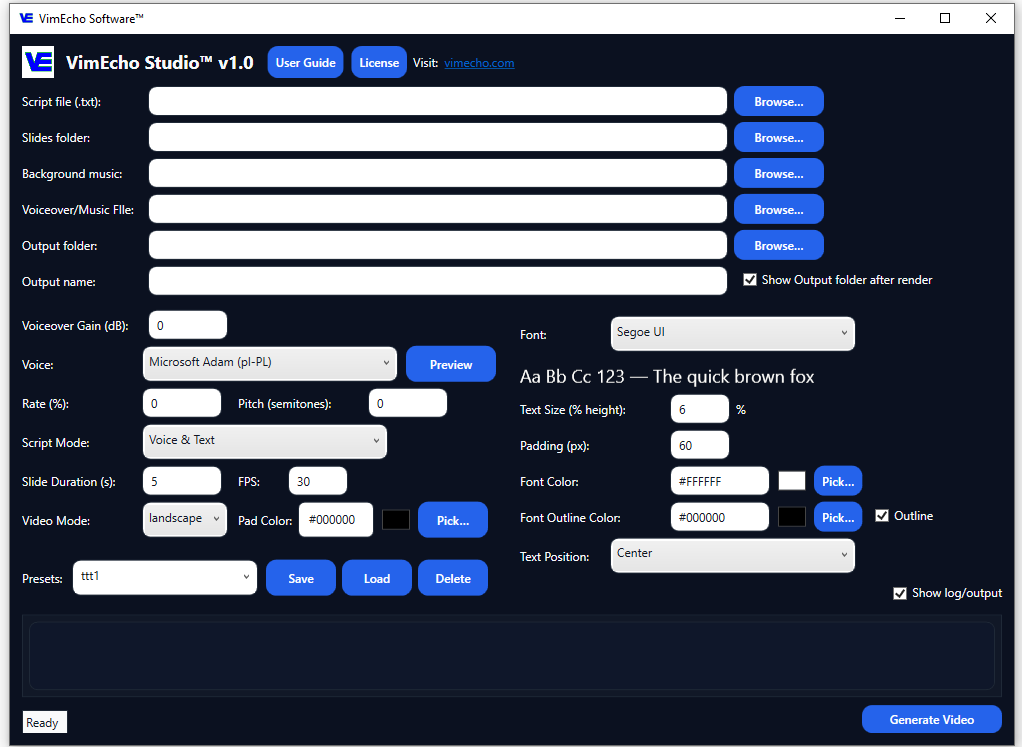
If your content starts with a script, VimEcho Studio finishes it. Load your script, a folder of slides or images, choose a voice and optional background music — and generate a finished, publish-ready video. Completely offline on Windows.
No cloud rendering. No subscription. No editing timeline to manage. Just a repeatable workflow that lets you focus on content, not production.
✓ One-time purchase · ✓ Windows · ✓ No subscriptions
Why Creators Use VimEcho Studio
Built for people who produce content consistently — not for one-off projects.
A Repeatable Workflow
Same process every time — script, slides, voice, generate. Build a content routine instead of reinventing the wheel with each video.
Consistent Visual Style
Use the same slide library across videos. Your channel builds a recognizable look without extra design work per video.
Offline & Private
Your scripts and content stay on your machine. No cloud service reading your drafts or storing your assets.
No Subscription Creep
Buy once, use forever. Produce 10 videos or 1,000 — the price doesn't change based on your output volume.
Flexible Voiceover
Use built-in TTS to start fast, or upload your own recorded narration when you want that personal channel voice.
Faster Output
No editing timeline, no keyframes, no manual audio sync. Write the script, generate the video — move on to the next one.
How It Works — Four Steps
The full workflow from idea to finished video.
Write Your Script
Each line of your script becomes one timed slide in the finished video. Keep it structured — hook, main points, conclusion. You can write it yourself or use an AI tool to draft a starting point, then refine.
Build a Slide Folder
Gather the images that support your script — stock photos, screenshots, charts, or AI-generated visuals. One image per script section. Organize them in a folder and point VimEcho to it.
Add Voice & Music
Pick a TTS voice that fits your content tone, or upload your own narration. Add background music from your library if you want a more polished result. Both are optional and swappable per project.
Generate & Publish
Name the file, set the output folder, click Generate. VimEcho syncs your script, slides, voice, and music into a complete video — ready to upload. Then start the next one.
Build a Reusable Slide Library
The fastest creators using VimEcho build a library of slides once — intro cards, section headers, backgrounds, icon sets — and reuse them across every video. Each new script becomes a fast build with a consistent look. You design it once; it pays off across every upload.
See It in Action — Creator Content
These videos were made entirely inside VimEcho Studio. No external editing software.
Finance channel example — "Saving Your First $1,000"
AI & Side Hustle — "Best Side Hustles in 2026"
Faceless Creator style example
Before and After VimEcho Studio
The production bottleneck is where most creators stall. VimEcho removes it.
Without VimEcho Studio
- Hours editing each video manually
- Hard to maintain consistent output
- Monthly fees that scale with your needs
- Cloud tools that access your script content
- Slow enough to kill momentum
With VimEcho Studio
- Script + images = finished video
- Publish one video per day if you want
- One-time purchase — output as much as you want
- Everything stays on your machine
- Fast enough to actually build a channel
Creator Video Formats That Work Well
VimEcho Studio is purpose-built for script-based, narrated content — the formats that compound over time on YouTube. Creators can also explore YouTube-focused workflows or scale content using automation tools.
Tutorials & Walkthroughs
Explain steps clearly with screenshots, bullet slides, and narration. Great for software, how-to content, and skill-based channels.
Explainers & Educational
Teach concepts with consistent slides, diagrams, and controlled pacing. Finance, history, science, and self-improvement all work well here.
List Videos & Rankings
Turn a structured script into a clean, repeatable narrated format. "Top 5," "Best X for Y," and countdown formats are fast to produce and consistently watched.
Commentary & Opinion
Script your take, pair it with supporting images, and deliver it with narration. Clean and repeatable without appearing on camera.
Why Offline Matters for Creators
The subscription model is built for platforms, not creators. Here's why going offline changes the math.
No Output-Based Billing
Most cloud tools charge based on renders, minutes, or seats. VimEcho charges once — produce 10 videos or 500, the price is the same.
No Internet Dependency
Render videos anywhere — offline flight, rural location, poor connection. No cloud means no waiting on someone else's servers.
Your Assets, Your Organization
Keep your slide libraries, scripts, and output files organized your way. Nothing is locked into a platform folder structure you didn't choose.
No Silent Data Use
Cloud video tools have terms of service. Your scripts and content are yours — and with VimEcho, they never leave your machine to find out what those terms say.
The best content channels aren't built on viral luck. They're built on repeatable systems. VimEcho is the production side of that system.
Frequently Asked Questions
What kind of creator videos is VimEcho Studio best for?
Narrated slide-style content — tutorials, explainers, list videos, educational content, commentary, and training-style YouTube content. If your video starts with a script and uses supporting images, this is the right tool.
Can I use my own voiceover instead of TTS?
Yes. You can use built-in TTS voices or import your own recorded narration — whichever fits your channel style. You can mix and match per project.
Does VimEcho Studio require cloud rendering or a subscription?
No. VimEcho Studio runs entirely offline on Windows after a one-time license activation. No subscription, no cloud rendering, no recurring fees.
Can I reuse slides across multiple videos?
Yes — and this is one of the fastest ways to accelerate your output. Build a reusable slide library once, then load it into each new project. Your channel maintains a consistent visual style with minimal setup per video.
Is VimEcho Studio right for cinematic or heavily edited videos?
VimEcho is built for script-based narrated slide formats — not cinematic editing. If your content is mostly talking-head footage or requires complex transitions, a traditional editor may suit that better. But for tutorials, explainers, and structured content, VimEcho is significantly faster.
Where do I buy VimEcho Studio?
Visit the pricing section on the homepage. Licenses start at $19.99 for 2 seats. License key delivered by email after checkout.
Ready to Start Building Your Channel?
If you have ideas and a script workflow, VimEcho Studio handles the production. One-time purchase — no subscriptions, no cloud, no limits on how much you create.
Get VimEcho Studio — from $19.99Windows · One-time purchase · Offline after activation · License key by email