Video Creation That Never Touches the Cloud
When you create videos using cloud-based tools, your scripts, voice recordings, and slide content pass through external servers — subject to terms of service you may not have read closely. VimEcho Studio works differently. Everything happens on your machine. Nothing is transmitted to generate your video.
One-time license activation online, then completely offline from that point forward. Your content is yours — and it stays that way.
No cloud uploads to render
No external servers process your content
No subscription or recurring access required
✓ One-time purchase · ✓ Windows · ✓ Offline after activation
Why "Offline" Matters — and What It Actually Means
Offline doesn't mean limited. It means the processing happens on your machine, under your control, with no external dependency. Offline workflows pair well with script-based video creation or local video editing tools.
Your Scripts Never Leave
Training content, onboarding procedures, HR policies, legal documents — written materials often contain sensitive information. With VimEcho, they stay in whatever folder you put them in.
Your Slides Stay Local
Screenshots of internal systems, proprietary diagrams, client-facing materials — your image assets are never uploaded to a cloud rendering service to produce your video.
Your Voice Recordings Are Private
If you record your own narration, that audio file never passes through an external server. It's processed locally on the same machine where you recorded it.
No Terms of Service Surprises
Cloud platforms have terms of service governing how your content can be used. When your content never leaves your machine, those clauses simply don't apply.
Who Benefits Most From an Offline Video Workflow
Any organization or individual whose work involves content that shouldn't be on someone else's server.
Legal & Compliance Teams
Legal procedures, compliance training, and regulatory content often can't leave internal infrastructure. VimEcho keeps it all local.
Healthcare & Patient Education
Patient-facing education content and staff training materials that involve sensitive clinical information need to stay off external servers.
Government & Public Sector
Internal training and procedural videos for government agencies often require content to remain within controlled systems.
HR & Internal Training
Onboarding, performance, and policy content is internal by definition. Keeping it offline is the right default, not an extra precaution.
IT & Security Teams
Security-conscious teams that evaluate every tool for data exposure will appreciate a workflow that has zero cloud surface area by design.
Creators Who Value Privacy
Your scripts, ideas, and content pipeline are yours. An offline tool means no platform can access, analyze, or train on your unpublished work.
Cloud Video Tools vs. VimEcho Studio
A direct comparison of what happens to your content in each approach.
| Feature | Cloud-Based Tools | VimEcho Studio |
|---|---|---|
| Script processing | Uploaded to external servers | Stays on your machine |
| Slide / image assets | Uploaded for cloud rendering | Stays in your local folder |
| Voice / audio files | Often processed on external servers | Processed locally only |
| Internet required | Required for every render | Only once, for activation |
| Pricing model | Monthly or annual subscription | One-time purchase per seat |
| Terms of service risk | Content may be subject to platform ToS | Content never reaches the platform |
| Access after cancellation | Lost when subscription ends | Permanent — it's yours |
The Offline Production Workflow
Four steps — all of them local, none of them dependent on an internet connection after activation.
Prepare Your Script Locally
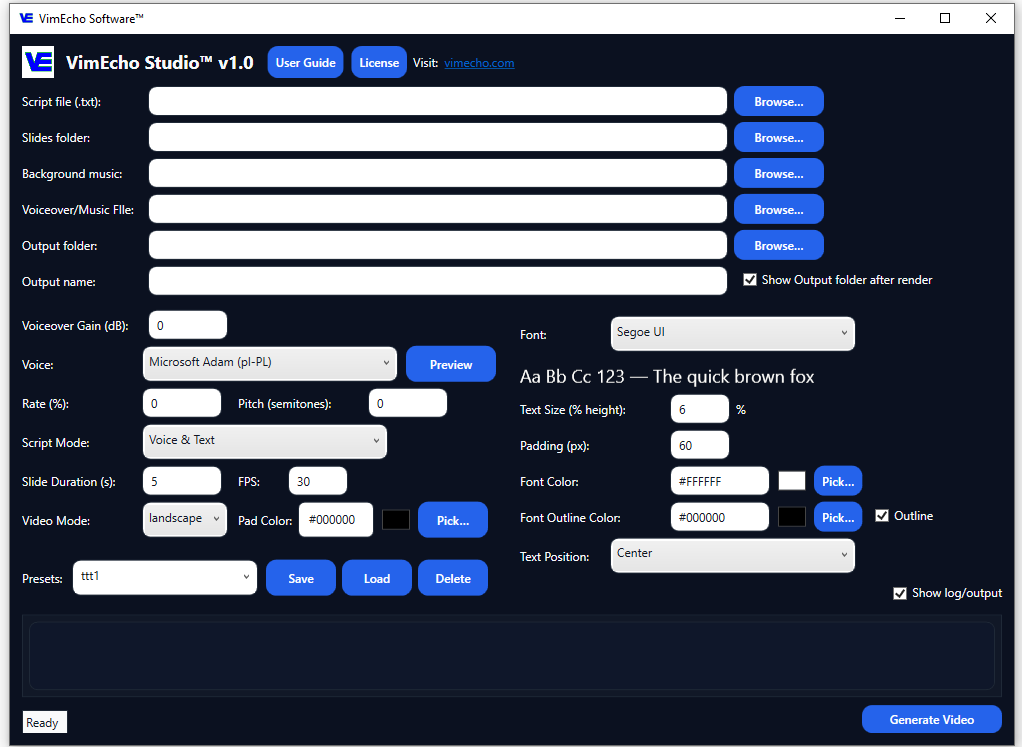
Write your training content, policy document, or SOP as a plain script. Each line becomes a timed slide. The file lives in whatever folder you choose — it's never moved or uploaded.
Organize Your Slides Locally
Gather your supporting images — screenshots, diagrams, charts, or photos — into a folder on your drive. VimEcho reads from that folder directly. Nothing is copied to an external location.
Choose Voice & Music Locally
Use built-in TTS (processed entirely on-device) or upload a narration recording. Add background music from your own library. All audio stays local throughout the process.
Generate — Entirely Offline
Click Generate. VimEcho processes everything on your machine and outputs a finished video file to the folder you specify. No render request sent to a server. No waiting on cloud infrastructure.
What "Offline After Activation" Actually Means
When you first open VimEcho Studio after purchase, it makes one outbound connection to verify your license key. That's the only time it contacts the internet. After activation, you can disconnect permanently — VimEcho will continue to work indefinitely with no further internet access required. Your content, your machine, your network decisions.
What Changes When You Go Offline
The practical difference between cloud-dependent and offline-first video production.
Cloud-Based Video Tools
- Content uploaded to external servers to render
- Monthly fees whether you produce or not
- Access ends when subscription lapses
- Terms of service govern your uploaded content
- Dependent on the platform's uptime and pricing decisions
VimEcho Studio (Offline)
- Everything processed locally — nothing uploaded
- One-time cost — produce as much as you need
- Software is yours permanently after purchase
- Your content never reaches any platform ToS
- Works the same whether the internet is up or not
Training Videos Made Entirely Offline
These were produced inside VimEcho Studio on a local Windows machine — no cloud rendering, no external processing.
Internal Training Example — Forklift Safety
Internal Training Example — CRM Walkthrough
When your content never leaves your machine, there's nothing to breach, nothing to subpoena, and nothing subject to someone else's terms of service.
Frequently Asked Questions
Does VimEcho Studio require cloud rendering or online services?
No. VimEcho Studio runs entirely offline on Windows. It does not upload your scripts, slides, or audio to any external server to generate your video.
Do I need to upload my files to use VimEcho Studio?
No. All processing happens locally on your machine. Your script, slides, and narration never leave your PC during video generation.
Is VimEcho Studio suitable for sensitive or confidential content?
Yes. Because VimEcho works entirely offline after a one-time activation, it's well-suited for workflows involving confidential materials — HR documents, legal content, compliance training, patient education, and proprietary business processes.
Does VimEcho use AI to generate images or video?
No. VimEcho Studio is a script-driven narrated slide tool. You supply the images — VimEcho syncs them with your script and narration to produce the video. No AI-generated imagery, no unpredictable output.
Does VimEcho Studio require an internet connection?
Only once — to activate your license key after purchase. After that, it runs completely offline with no internet required.
Is this a subscription?
No. VimEcho Studio is a one-time purchase per seat. Buy once, use it for as long as you need it — no recurring fees, no access cutoff.
Keep Your Content Where It Belongs — On Your Machine
One-time purchase. No cloud dependency. No subscription. Your scripts, slides, and recordings stay local from start to finish.
Get VimEcho Studio — from $19.99Windows · One-time purchase · Offline after activation · License key by email