How to Make Training Videos for Employees — Without Complex Editing
If your business has written training materials, procedures, or onboarding documents, you already have everything you need to start making employee training videos. VimEcho Studio turns those materials into finished videos in four steps — no editing timeline, no cloud upload, no subscription.
Add your script
Add your slide folder
Add voice & music
Click Generate
✓ One-time purchase · ✓ Windows · ✓ Offline after activation
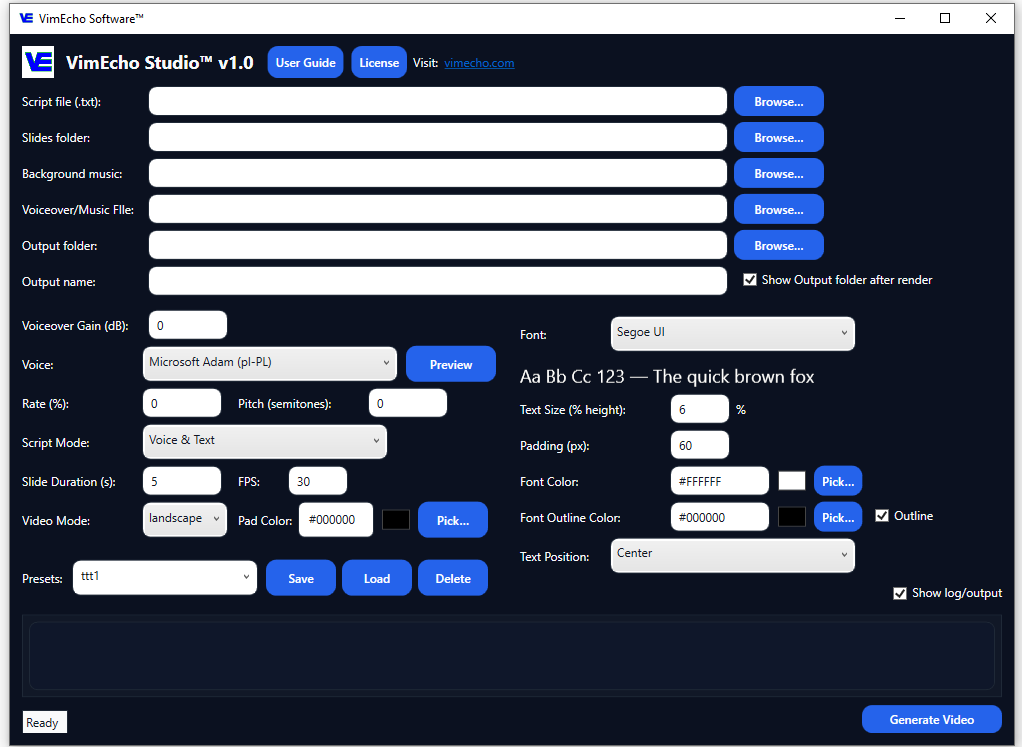
The Four-Step Training Video Workflow
Start with materials you already have. Most businesses have training scripts, SOPs, or process documents sitting in a folder somewhere — this is where they become something usable.
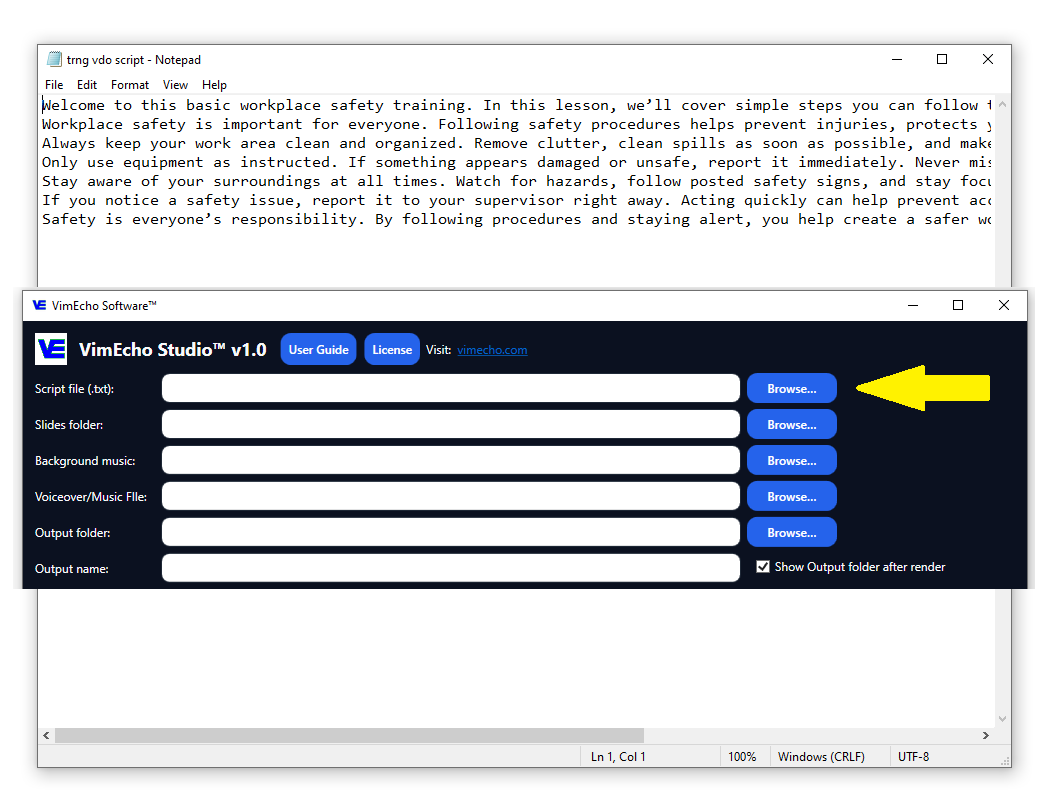
Select Your Script
Load your employee training script, onboarding instructions, SOP, or process explanation. Each line of your script maps to a timed slide — so a well-structured script produces a well-structured video.
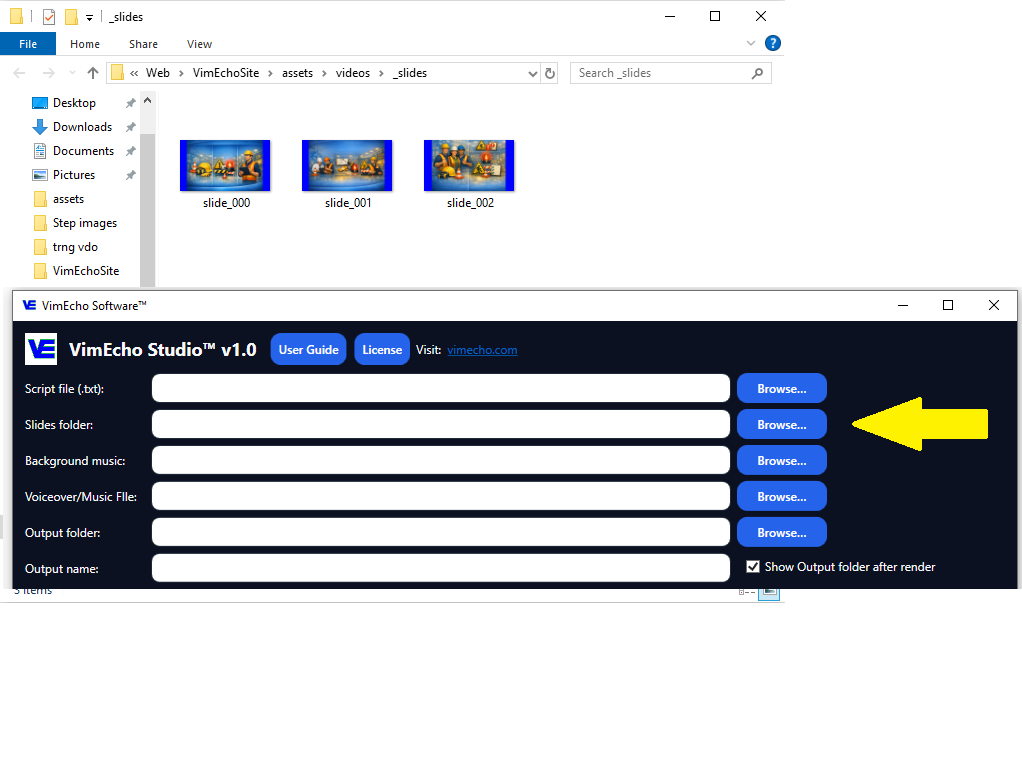
Choose Your Slide Folder
Point VimEcho to the folder containing your training visuals — slides, screenshots, diagrams, or workplace photos. These images appear in sync with the narration as the video plays.
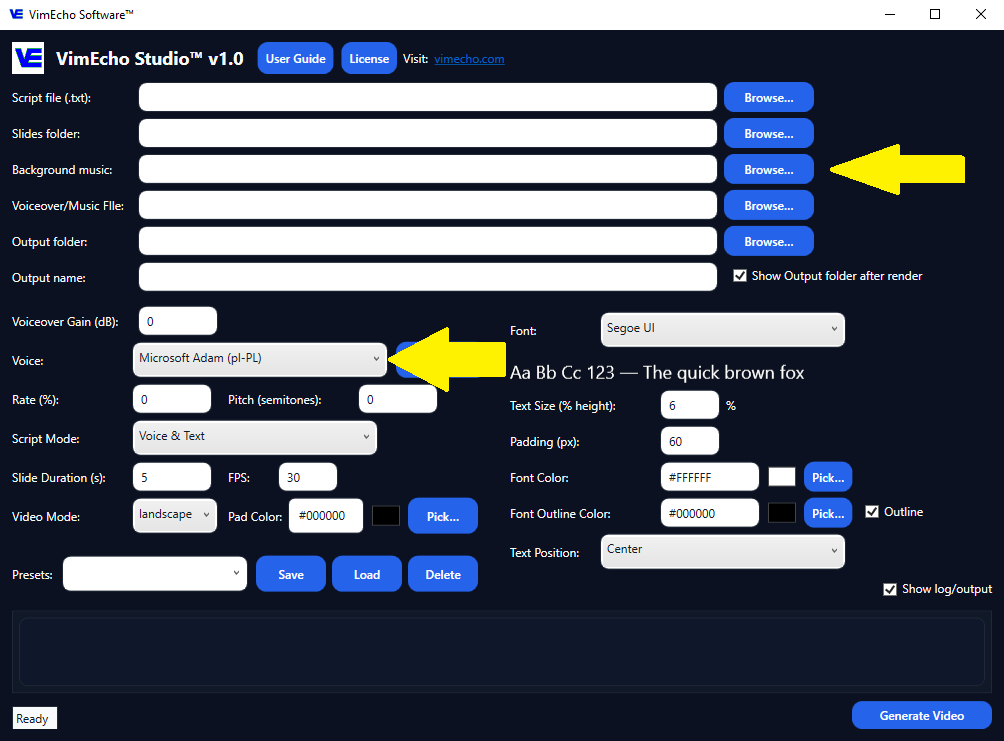
Add Voice and Music
Choose a built-in TTS voice or upload your own recorded narration. Add optional background music for a more polished result. Both are handled automatically — no separate audio editing required.
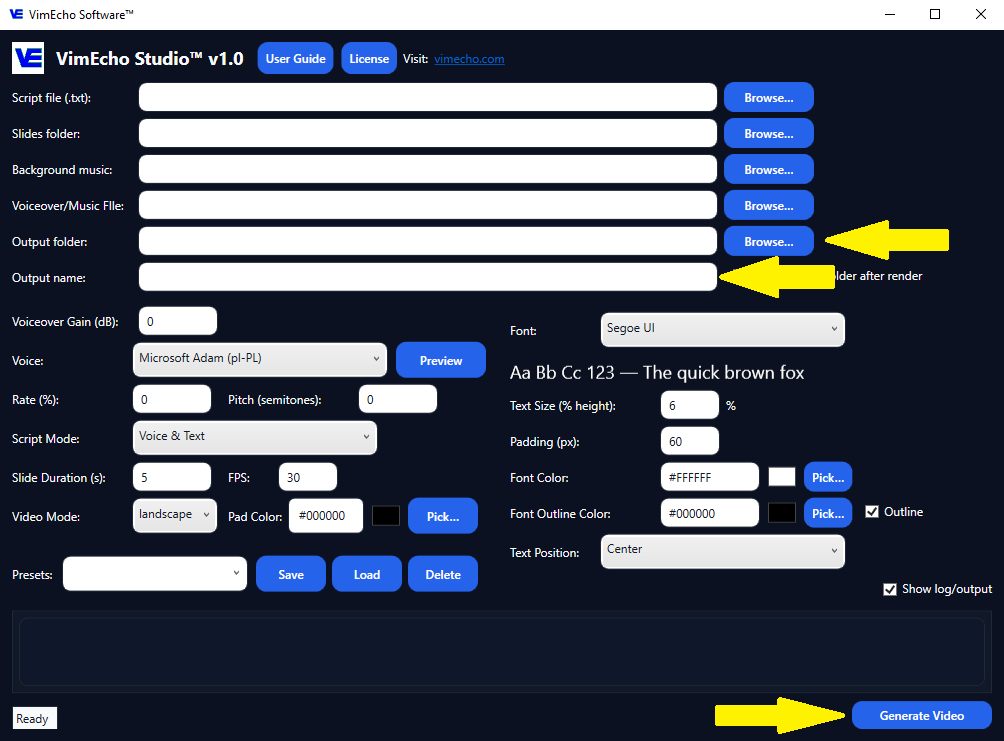
Name, Set Output Folder, Click Generate
Give the video a name, choose where to save it, and click Generate. VimEcho syncs your script, slides, voice, and music into a complete, employee-ready training video — offline, on your machine.
What You Start With — What You End Up With
If you already have training materials in any format, you're closer than you think.
What You Start With
- A written training script or SOP document
- Slides, screenshots, diagrams, or photos
- TTS narration (built-in) or your own recording
- Optional background music
What You End Up With
- A complete, reusable employee training video
- Consistent structure and messaging every time
- Content employees can watch, pause, and rewatch
- A repeatable workflow for your next video
See the Finished Result
This workplace safety training video was created entirely inside VimEcho Studio — no external editing software.
Basic Workplace Safety Training — English
Why This Workflow Works for Employee Training
Training content has different needs than marketing or YouTube content. It needs to be clear, consistent, and easy to update — not cinematic.
Traditional Training Video Problems
- Hours of editing per video
- Re-recording required for every small change
- Inconsistent quality between trainers
- Hard to scale across locations or new hires
- Cloud platforms storing your sensitive internal content
With VimEcho Studio
- Script-to-video in minutes, not hours
- Update the script → regenerate the video
- Consistent format and messaging every time
- Scales to any number of employees or locations
- Everything stays on your machine — your files, your control
Make the Same Video in Multiple Languages
Once you have a training video, creating it in a second language takes just two additional steps — translate the script, select the right voice, and generate. The slides stay exactly the same. No re-editing, no separate production run.
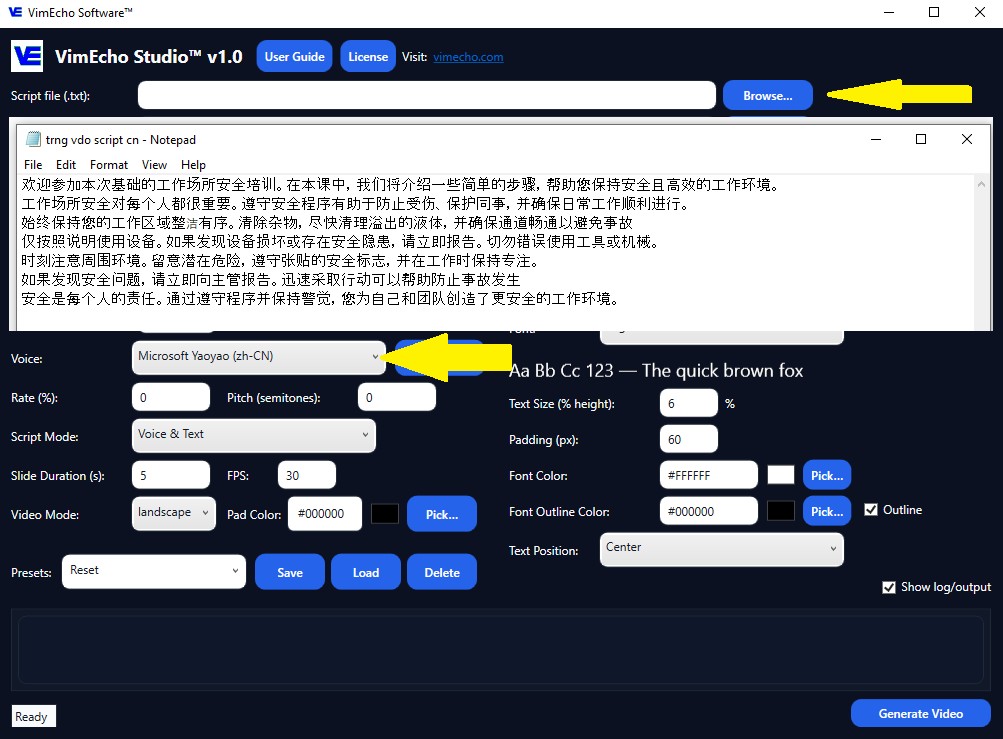
Translate Script & Select Voice
Translate your existing training script into the target language. Load it into VimEcho and select a compatible TTS voice for that language — or upload a narration recording. Every other setting stays the same as your original video.
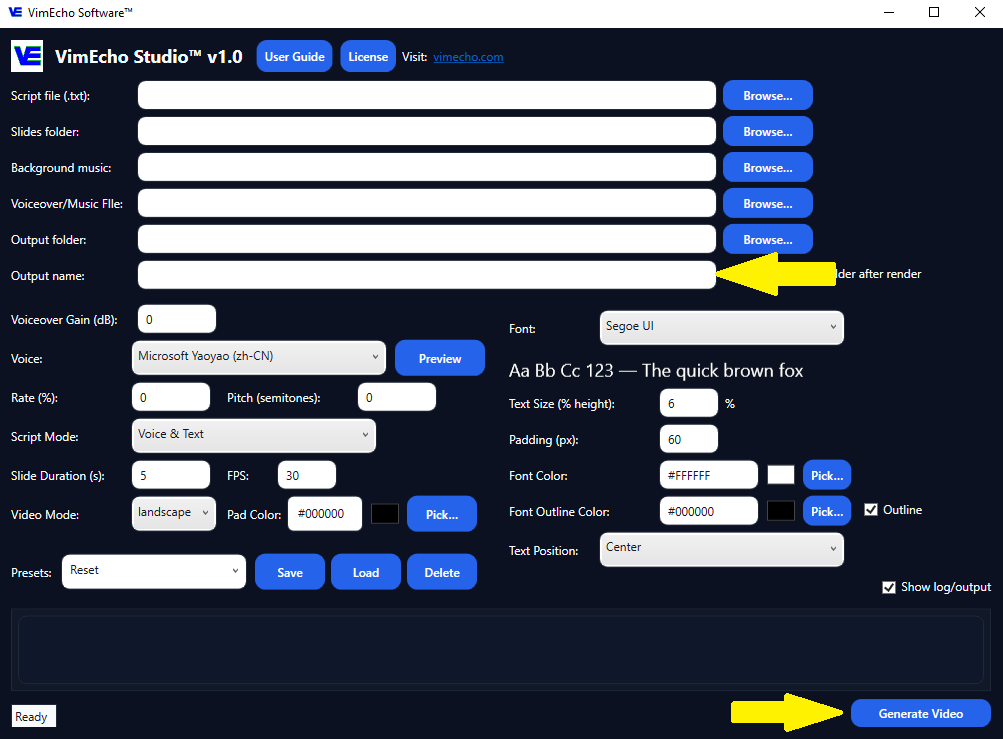
Rename & Generate
Rename the output file to reflect the new language version, then click Generate. VimEcho produces a complete second training video reusing the same slide folder — just with the new language's narration synced in.
Basic Workplace Safety Training — Spanish
Basic Workplace Safety Training — Chinese
Features That Make Training Video Creation Easier
Built for structured content production — not flashy editing.
Script-Based Workflow
Start from your written training content — not a blank timeline. Each script line becomes a timed slide automatically.
Slide Folder Support
Point to a folder of images. VimEcho syncs them to your script without any manual dragging or positioning.
Flexible Voice Options
Use built-in TTS narration or upload your own recording. Switch per project or per language version.
Background Music
Add optional music for a more polished feel. Handled automatically — no separate audio track editing.
Easy to Update
When processes change, update the script and regenerate. No re-recording, no re-editing the whole video.
Offline & Private
Everything runs locally on Windows. Your internal scripts and content never leave your machine.
Who This Works For
For more structured systems, explore internal training workflows or presentation-based training videos. Different teams use VimEcho Studio for different reasons — here's how each one benefits.
HR & Training Departments
Build a reusable library of onboarding, compliance, and process training videos without needing a video production team.
Operations & Managers
Turn SOPs and safety procedures into video that gets delivered the same way every time — to every employee, every shift.
IT & Systems Trainers
Screenshot-based walkthroughs for internal tools, dashboards, and software — without screen recording complications.
Frequently Asked Questions
How do you make training videos for employees?
Start with a written script, add a folder of supporting images or slides, choose a narration voice, and generate the video. VimEcho Studio handles the sync and output — no timeline editing required.
Can VimEcho Studio be used for onboarding videos?
Yes. It works for onboarding, internal process training, safety instruction, software walkthroughs, SOPs, and any other structured employee training content.
Do I need editing experience?
No. VimEcho Studio replaces the editing step. You prepare a script, a folder of images, and choose a voice — it handles the rest.
Can I make training videos in multiple languages?
Yes. Translate your script, select the appropriate TTS voice or upload a recording in the new language, rename the output file, and click Generate. The same slides are reused — only the audio changes.
Does VimEcho Studio require an internet connection?
Only once, to activate your license key after purchase. After that it runs completely offline — no internet needed to create or export videos.
Is this a subscription?
No. VimEcho Studio is a one-time purchase. Buy once, use it on your licensed machines for as long as you need it.
Ready to Make Employee Training Videos Faster?
If you already have written training content, you can start turning it into reusable video today. One-time purchase, no subscriptions, no cloud dependency.
Get VimEcho Studio — from $19.99Windows · One-time purchase · Offline after activation · License key by email