Your Script.
Your Machine.
Your Video.
Tired of cloud tools harvesting your scripts, locking you into monthly fees, and rendering your content on someone else's servers? VimEcho Studio runs entirely on your PC — no logins, no subscriptions, no surprises.
✓ One-time purchase · ✓ License key by email · ✓ Your projects stay on your machine
Line by line — each line becomes a timed slide
TTS built-in or upload your own narration
Background music + fully synced video output
All of it happens locally. Nothing leaves your machine.
No Monthly Fees
Buy once, own it forever. No subscription creep, no price hikes, no cancellation anxiety.
Your Content Stays Yours
Scripts, voice files, slides — all stored on your drives. No silent training on your material.
No Internet Required
One activation online, then render as many videos as you want — fully offline, every time.
Built for Repetition
Repeatable workflows and batch content creation. Write a script, export a video. Repeat.
Built for Every Kind of Creator
VimEcho Studio handles the full range — from solo YouTubers to enterprise training teams.
Internal Training Videos
Keep sensitive HR and onboarding content off the cloud.
Onboarding Videos
Build consistent, repeatable onboarding at any scale.
YouTube & Faceless Channels
Script-to-video in minutes. No editing software needed.
Private & Confidential Video
Legal, medical, and proprietary content — stays local.
Course & Tutorial Creators
Explainers, how-tos, and e-learning at scale.
Employee Training
Standardize training without third-party platform dependency.
Free Tools — No Account Required
Two free offline audio tools to try before you buy anything. Run locally, keep your files private.
VimEcho Compressor
Lightweight offline audio compressor for quick dynamic control. Simple UI, fast results.
Version: v1.0 · Offline · Free
Download CompressorVimEcho Noise Filter
Reduce background hum and noise locally. No uploads. No tracking. Just cleaner audio.
Version: v1.0 · Offline · Free
Download Noise FilterWelcome Code
Enter this once when you first open either tool to unlock the UI:
FreeVimEchoTools
Same code for everyone — no account needed. Just a one-time unlock step.
Get Updates
Optional — be notified of new tools and early Studio access.
Email: support@vimecho.com
No pressure — free tools work without signing up.
Ready for the full package? VimEcho Studio takes you from script to finished video — slides, voiceover, music, all synced.
See Studio Pricing →VimEcho Studio
VimEcho Studio™ is your offline production center for script-based videos. Feed it your script, choose a slide folder, pick a TTS voice or upload custom narration, add background music — and it builds a fully timed, synced video without ever touching the internet.
- Script-to-slide sync with per-line timing
- Text-only, voice-only, voice + text, and no-script modes
- Background music support
- Designed for repeatable workflows and batch content
- No external editing software needed
✅ Available Now
VimEcho Studio is available for Windows as a downloadable ZIP. Purchase your license and get your key delivered by email — typically within 1–12 hours.
Didn't receive your key? Email support and we'll sort it fast.
VimEcho Studio — See It in Action
Real videos made entirely inside VimEcho Studio. No external editing software.
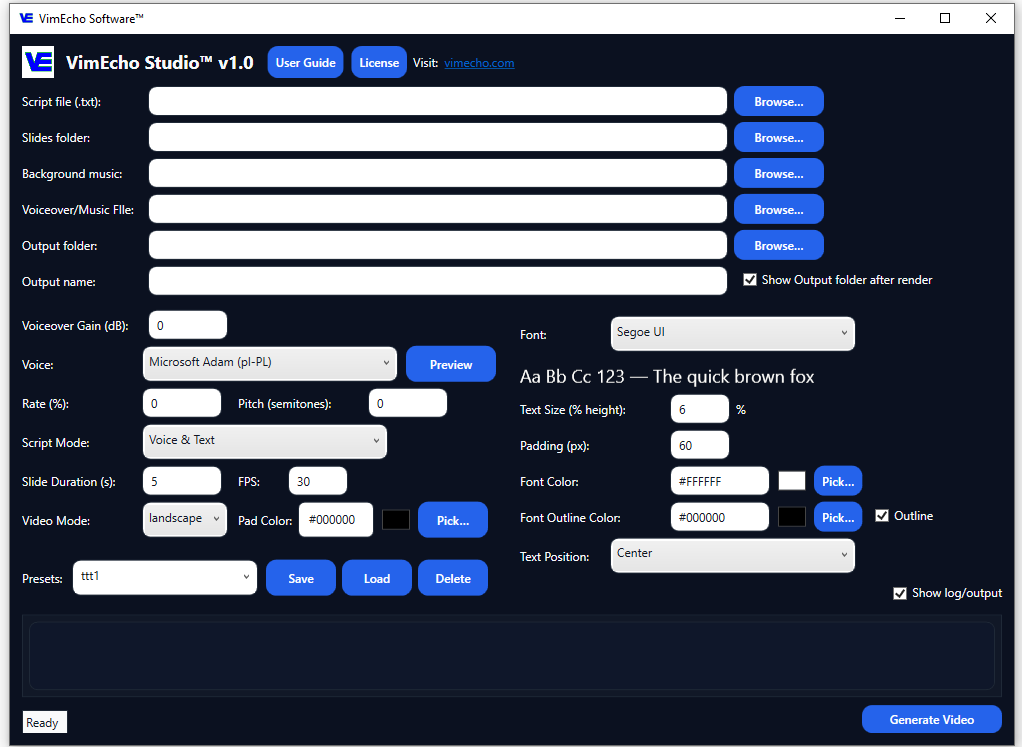
Main Workflow Overview
Education & Training
Corporate & Marketing
Non-Profit & Community
Lyric Videos & Animation
Creators & Individual Use
VimEcho Tracks Coming Soon
VimEcho Tracks is a companion tool that generates royalty-free background music offline — on your own machine. No licensing headaches, no internet required.
- AI-assisted MIDI generation with style presets
- Royalty-free, creator-friendly output
- Designed to plug directly into VimEcho Studio
Tracks will be a separate purchase, but built to work seamlessly with Studio.
Why Offline Matters
When your tools live in the cloud, your content does too — whether you agreed to that or not. VimEcho keeps your scripts, voice recordings, and music files on your drives, under your control, full stop.
No "terms of service surprise." No silent AI training on your work.
Main Features
Everything you need to go from script to finished video — without leaving your PC.
Offline-First
Activate once, then VimEcho runs locally indefinitely. No constant logins, no internet dependency for renders.
Script-Based Workflow
Write once, reuse everywhere. Build tutorials, explainers, and courses from a clean script with per-line slide sync.
One-Time Pricing
No monthly fees. Buy once, use it as long as you want on your licensed machines. Yours to keep.
Flexible Voiceover
Use built-in TTS voices or upload your own narration. Mix and match per project.
Background Music
Drop in background music tracks and VimEcho handles the timing alongside your voiceover automatically.
Batch & Repeatable
Built for content workflows. Run the same process again and again without setup friction.
Buy VimEcho Studio
One-time purchase, seat-based licensing. License key delivered by email after checkout.
📬 Key Delivery — What to Expect
- License key delivered by email to the address used at checkout.
- Typical delivery: within 1–12 hours.
- Didn't get it? Check spam/junk first, then email support@vimecho.com.
Manual delivery during launch phase — this ensures every key is verified before it goes out.
2 Seats
Individual creators on 1–2 PCs. Perfect starting point.
$19.99
Buy 2-Seat LicenseAlready Purchased?
Need your key re-sent? Contact support with your checkout email and we'll take care of it.
Contact SupportContact Support For Custom Seats And Pricing
Download VimEcho Studio
After purchase, download the ZIP below and enter your license key when the app opens. One-time internet connection required for activation — after that, it runs completely offline.
You can download first if you'd like to explore — the app will prompt for a valid key to unlock.
Download VimEcho Studio (ZIP)Frequently Asked Questions
Will VimEcho require an internet connection?
Just once — to activate your license key. After that, VimEcho runs entirely offline. No internet needed to render videos.
Is this a subscription?
No. VimEcho is a one-time purchase per seat. Buy once, use it as long as you want. No monthly fees, no renewals.
What platforms are supported?
The first release targets Windows PCs. Other platforms may be added in the future.
Does VimEcho use my content to train AI?
No. Your scripts, voice files, and slides never leave your machine. There's no server receiving your content — everything stays local.
How long does it take to receive my license key?
Typically within 1–12 hours of purchase. Keys are manually verified during launch phase. Check spam if it doesn't arrive, and email support if you're still waiting.
Can I try it before buying?
Currently, No — you can download the Studio app before purchasing. It will prompt for a key when you open it. You can try the free Compressor and Noise Filter tools with no purchase required.
Contact
Questions, licensing inquiries, or support? Reach out directly — a real person will respond.
Email: support@vimecho.com