Offline Video & Voiceover Studio for Real Creators
VimEcho Studio is an offline script-to-video and voiceover studio that lets you build synced slide videos with TTS or custom narration and background music all offline – without subscriptions or logins — no cloud required.
One-time purchase. Offline-first. License key delivered by email after purchase.
One-time purchase. Offline-first. You keep your projects on your own machine.
Built for Offline Control
- Script → Slides → Voiceover → Final Video
- Runs locally on your PC – no cloud rendering
- Perfect for YouTube channels, course creators, tutorials, advertising, training videos and much more!
Free Tools
These tools are 100% free to use and run offline. On first launch, you’ll enter a Welcome Code (below) to enable the tools. No account. No subscription. Just a quick unlock step.
Welcome Code
Enter this once the first time you open either tool:
FreeVimEchoTools
If you downloaded a tool somewhere else and don’t have the code, just visit VimEcho.com to get it. This code is the same for everyone and is only used to unlock the free tools UI.
VimEcho Compressor
Lightweight offline compressor for quick dynamic control. Simple UI, fast results.
Version: v1.0 • Offline • Free
VimEcho Noise Filter
Reduce background hum/noise locally on your machine. No uploads. No tracking.
Version: v1.0 • Offline • Free
Optional Updates
Want updates, new tools, and early access to VimEcho Studio? Optional signup (unsubscribe anytime).
No pressure — you can still download and use the free tools without signing up.
VimEcho Studio
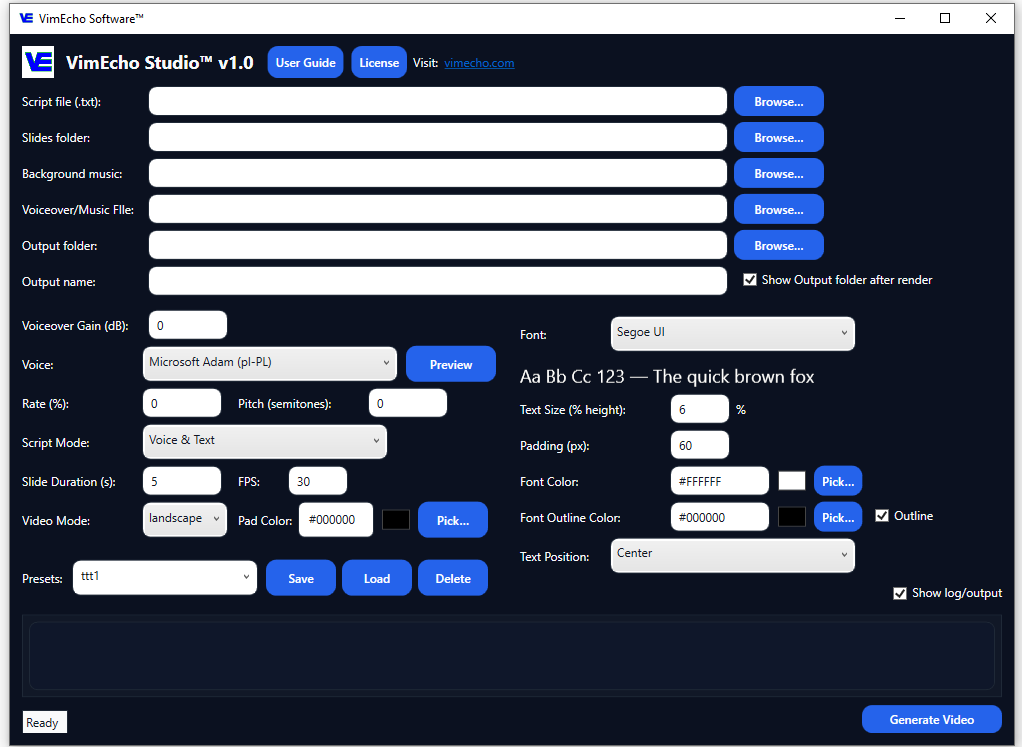
VimEcho Studio™ is your offline control center for script-based videos. Feed it your script, choose a slide folder, choose a TTS voice or upload a custom voiceover, add music, and let it build a fully timed video without ever uploading your content to someone else’s servers.
- Script-to-slide sync with per-line timing
- Text-only, voice-only, voice + text and no-script modes
- Background music support
- Designed for repeatable workflows and batch content
Status: Available Now
VimEcho Studio is available for Windows as a downloadable ZIP. After purchase, your license key will be delivered by email.
If you don’t receive your key within the delivery window, email support and we’ll fix it fast.
VimEcho Tracks
VimEcho Tracks (Coming soon) is a companion tool that generates royalty-free background music offline on your own machine.
- AI-assisted MIDI generation with style presets
- Royalty-free, creator-friendly output
- Designed to plug directly into VimEcho Studio
Tracks will be available as a separate purchase, but optimized to work seamlessly with VimEcho Studio.
Why Offline Matters
Offline tools keep your scripts, voice, and music files on your drives. No “terms of service surprise” or silent training on your content.
Main Features
Offline-First
Activation happens once, then VimEcho runs locally. No constant logins, no dependency on internet for every render.
Script-Based Workflow
Write once, reuse everywhere. Build tutorials, explainers, and courses from a clean script.
One-Time Pricing
No monthly subscriptions. Buy once, use it as much as you want on your licensed machines.
VimEcho Studio Interface
Easy To Use
See VimEcho Studio in Action
Real videos created entirely inside VimEcho Studio. No external editing software used.
Main Workflow Overview
Education & Training
Corporate & Marketing
Non-Profit & Community
Creators & Individual Use
Offline Script to Video Software for Windows
VimEcho Studio lets you convert scripts into fully rendered videos with synced slides, voiceover, and background music — completely offline.
Buy VimEcho Studio
One-time purchase, seat-based licensing. After you complete checkout, your license key will be delivered by email (manual fulfillment during launch phase).
Manual Key Delivery (Launch Phase)
- License key is delivered by email to the address used at checkout.
- Typical delivery: within 1–12 hours.
- If you don’t receive it: check spam/junk, then email support@vimecho.com.
(Automation is planned, but manual delivery ensures verified fulfillment while we finalize systems.)
Already Purchased?
If you already purchased and need your key re-sent, contact support with your checkout email.
Download VimEcho Studio
After purchase, download the ZIP and enter your license key when you open the app. It will ask upon opening. Once the key is entered and verified, the app will open. Click Generate to Activate the app (Internet connection required for Activation). Once the app is activated, it will unlock and run completely offline, no internet connection needed.
(If you prefer, you can download first — the app will request a valid key to unlock.)
FAQ
Will VimEcho require an internet connection?
You’ll need an internet connection once to activate your license key. After that, VimEcho is designed to run offline for everyday use.
Is this a subscription?
No. VimEcho is designed as a one-time purchase license per user or per seat.
What platforms are supported?
The first release targets Windows PCs. Other platforms may be considered later.
Contact
For questions, early access inquiries, or business/licensing discussions, you’ll be able to reach us at:
Email: support@vimecho.com
(Email address and support system will be finalized before public launch.)